Creating a Cohesive Channel Identity with Banner Bundles
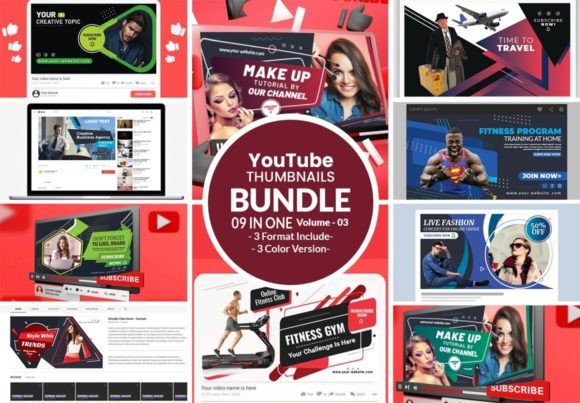
When a potential viewer lands on your channel, the very first thing they see isn't your latest video or your subscriber count—it is the visual landscape of your page. If that space looks disjointed or amateurish, you lose credibility before you’ve even had a chance to speak. This is where the "YouTube Social Banner Bundle" enters the conversation. It is not merely a collection of graphics; it is a comprehensive toolkit designed to solve the most common headache for content creators: maintaining visual consistency across a chaotic digital landscape. We know that YouTube is one of the essential parts of our lives, whether we are creating for it or consuming on it, and the standard for professional presentation has never been higher.
Let’s be honest about the reality of digital branding. You might have a fantastic thumbnail for your latest video, but if your profile banner is blurry, pixelated, or stylistically mismatched, it creates a jarring experience. The user might not consciously know why they don't trust your page, but their subconscious registers the lack of professionalism. A dedicated bundle for your channel art acts as the foundation of your visual identity. It ensures that the color palette, typography, and graphic elements used in your banner are perfectly mirrored in your community posts, story highlights, and merchandise links.
Why Technical Specifications Matter for Digital Assets
One of the most frustrating aspects of design for non-designers is the technical barrier. You might have a great idea, but if you don't understand resolution, color modes, or file formats, the final product often falls flat. This specific bundle addresses those pain points head-on by offering a size of 2560x1440 PX. This is crucial because YouTube displays differently on a television, a desktop monitor, and a mobile phone. The "safe area" for text is small, and starting with a high-resolution canvas ensures your design remains crisp on 4K screens.
Furthermore, the inclusion of CMYK color profiles is a massive advantage that many digital-only creators overlook. While RGB is for screens, CMYK is for print. If you plan to extend your brand beyond the screen—perhaps selling stickers, t-shirts, or printing flyers for a local meetup—having your design assets in CMYK ensures that the colors you see on your monitor are the colors that come out of the printer. Combined with a 300 DPI resolution, this bundle bridges the gap between digital content and physical merchandise, saving you the headache of color correction later.
Practical Applications Beyond the Header
While the name suggests a focus on the main channel banner, the utility of a high-quality design bundle extends far wider. If you are a small business owner, think of these assets as the building blocks for a broader marketing strategy. The elements included in a robust bundle—whether they are geometric shapes, abstract backgrounds, or stylistic flourishes—can be repurposed for a variety of media. For instance, the background texture used in your banner could easily become the backdrop for an Instagram quote post or a Pinterest pin, creating a seamless brand experience.
Consider the entrepreneur launching a new product line. The banner design sets the mood. If you are selling high-end tech gadgets, a sleek, modern sans-serif typography style within the bundle helps convey innovation. If you are a baker or a crafter, a warmer, handwritten script font style evokes a sense of personal touch and care. The versatility of having fully editable files means you aren't stuck with a static image. You can adjust the kerning, change the color of a specific graphic element, or rearrange the layout to suit a specific campaign without breaking the overall brand structure.
The Power of Editable File Formats
A common frustration with design templates is the "locked" nature of the file. You buy a template, but you can't change the font because you don't have the software, or the layers are flattened, making edits impossible. This bundle solves that by providing Fully Editable Illustrator (.ai) files, Illustrator (.eps) files, and PDF files. This is the gold standard for design assets.
Why does this matter to you? It matters because it future-proofs your brand. Six months from now, you might want to change your tagline or update your upload schedule graphic. With native vector files, you can scale these elements up for a poster or down for a business card without losing quality. Unlike a rasterized JPG or PNG, which becomes pixelated when enlarged, these formats retain their sharpness. This flexibility is essential for anyone serious about long-term branding, allowing for quick pivots and updates as your content strategy evolves.
Navigating Typography and Font Usage
Typography is often the silent killer of good design. You can have a beautiful background image, but if the text is illegible or stylistically jarring, the message is lost. A key feature of this specific offering is the transparency regarding fonts. The inclusion of font information and download links for free Google Fonts within the main file is a massive time-saver. It eliminates the guesswork of "What font is this?" and ensures you can legally use the typography across all your platforms.
When utilizing these font links, consider the hierarchy of your information. Your channel name should be the most dominant element, likely using a bold display font. Your upload schedule or social handles should be secondary, perhaps using a cleaner sans-serif for readability. By sticking to the fonts provided in the bundle, you ensure that your visual voice remains consistent. It prevents the temptation to mix too many unrelated typefaces, which can make a design look cluttered and chaotic.
Streamlining the Creative Workflow
For the busy content creator or marketer, time is the most valuable currency. Spending hours trying to build a banner from scratch in a free online editor often results in frustration and mediocre results. By using a pre-structured bundle that is "super easy to use," you bypass the steep learning curve of graphic design. The layout decisions have already been made by a professional; your job is simply to customize the details to fit your specific brand personality.
This efficiency allows you to focus on what you do best—creating content, writing copy, or managing your business. Instead of worrying about pixel alignment or whether your color codes match, you can simply swap out the placeholder text and export. It transforms the design process from a technical chore into a creative exercise. Whether you are a hobbyist looking to make your channel look more official or a marketing professional managing multiple client accounts, having a reliable, high-quality template library is a strategic asset that pays dividends in saved time and professional presentation.